
18 October 2026
Best FPL Planners 2026/27: Free & Paid Apps Compared
An FPL planner helps you see what happens after your next transfer: who you can afford, how many free transfers you will have, and whether your squad still works when the fixtures change. Some apps add predicted points and automatic transfer suggestions. Others concentrate on fixtures, player comparisons or ownership.
There is no single winner for every manager. Here is what the main options offer, with particular attention to what you can do for free.
Where to start: fpl.team puts multi-week predictions inside its free planner; LiveFPL combines transfer planning with ownership context and player comparisons; nextXI adds gameweek simulations; PlanFPL provides squad ratings and adjustable transfer prices. FPL Review and FPL Copilot also offer projection-driven solvers. Our own FPL planner is free to use without signing in and includes a plan solver. The right choice depends on whether you want to enter your own moves or have a tool suggest them.
Disclosure and scope: this article is published by FPL Cat, which has its own planner and is included below. The comparison draws on research from 6–11 October 2026, including hands-on walkthroughs of fpl.team, PlanFPL, nextXI and LiveFPL, plus our own check of FPL Cat on 18 October. Coverage of other services is based on public pages and documentation, including a logged-out look at several of them on 6 October and FPL Copilot's guide checked on 15 October; their paid tools were not tested. FPL Cat's entry also draws on its own product documentation on 18 October. Features and subscription terms can change.
What to look for in an FPL planner
Start with the job you need it to do:
- Plan transfers: carry moves, money in the bank and available free transfers into later gameweeks.
- Compare players: see fixtures, price, minutes and useful performance statistics while choosing a replacement.
- Compare routes: save an alternative plan and check what you give up by taking a hit or using a chip.
- Use projections: distinguish next-week predictions from later-week predictions and multi-week totals. These can have different access rules.
- Use a solver: ask the app to suggest a sequence of moves. A solver is an extra feature; a manual planner can be useful without one.
Before subscribing, try the same task in each app: import your team, make a transfer now, roll the following week, then make two transfers. Check the budget, hits and remaining free transfers. That tells you more about everyday usability than a long feature list.
Five planners tested hands-on
The recorded walkthroughs of fpl.team, LiveFPL, nextXI and PlanFPL used a real squad to try future-week navigation, transfers and player selection. fpl.team and LiveFPL were used without signing in, nextXI with a free account, and PlanFPL both signed out and with a free sign-in. They were exploratory sessions, rather than a timed benchmark with an identical task in every app. The access distinctions below are observations from those sessions. FPL Cat's planner, which we build, is described last in this section; we tested it ourselves on 18 October 2026, so read it as a vendor's own description.
| Planner | Particularly useful features observed | Free access observed | Paid layer or qualification |
|---|---|---|---|
| fpl.team | Multi-week player predictions, transfer bookkeeping and transfer/captain advice | Planning across future weeks, player predictions within the planner and advice worked without signing in | Display ads support free access; subscriptions add ad removal and expanded features. The solver's listed free allowance was three weeks and two plans; we did not run it |
| LiveFPL | Ownership context, an affordable-player filter, comparisons and an editable fixture ticker | Future-week planning, player statistics, comparisons and the ticker worked without signing in | Display ads were present. We did not find a separate LiveFPL points-projection model in the tested planner |
| nextXI | Transfer planning alongside a detailed fixture ticker and gameweek simulations | Future-week transfers, captaincy, chips and next-gameweek projections; later-week pitch cards also showed predictions | Premium adds features including multi-week player totals, the solver and more saved drafts. Later-week predictions were locked in the player pop-up, even when visible on the pitch |
| FPL Cat | A plan solver, a team rating out of 100, and a players list you can sort by predicted points, price or ownership, with a ★ shortlist (watchlist), comparisons and editable fixture difficulty | Planning across future weeks, weekly player predictions, team totals, the plan solver, all sorts except 6-GW totals, the shortlist and comparisons worked without signing in | Pro adds 6-GW player totals (and sorting by them), Wildcards, later Free Hits, up to 10 saved plans and the assistant. Plans are kept in your browser; saving them to an account (two free) needs a free sign-in |
| PlanFPL | Immediate squad ratings, editable transfer prices and player details including rotation partners | Future-week transfers and next-gameweek predicted points and ratings | Free sign-in adds saving across devices. Later-week prediction locks remained after sign-in; the account page offers supported premium data through a linked Fantasy Football Scout Premium account |
fpl.team: planning with predictions on the pitch
fpl.team combines the practical work of planning transfers with predicted points for players across future gameweeks. Its planner credited those projections to FPL Copilot. In our walkthrough, moves carried forward and free transfers rolled over, while advice panels suggested captaincy and transfer options.
That combination is useful if you want numbers beside your proposed moves without leaving the planner. The free version includes advertising. Saving drafts requires a free account, and the paid tiers expand access to features such as the solver and draft tools. We tested the free web planner rather than the paid assistant or native apps.
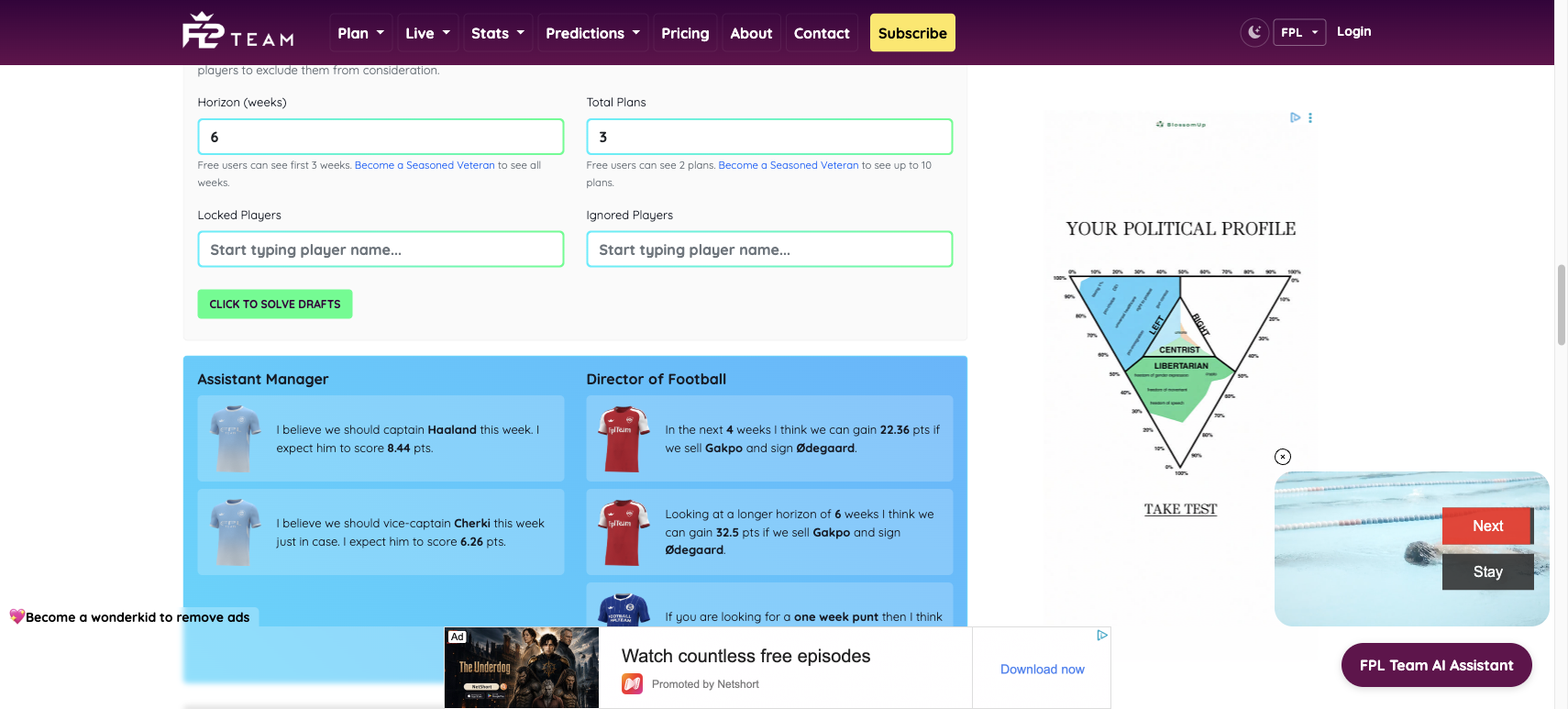
fpl.team, 11 October 2026: the free advice panels were visible while logged out. The solver fields state their free limits; we did not run the solver. Original research screenshot.
LiveFPL: fixtures, replacements and ownership
LiveFPL's replacement picker brings together an affordable-player filter, search, team filters, sorting, player details and comparisons. Its fixture ticker also shows how many of your players belong to each club and lets you edit difficulty ratings.
The planner displays expected effective ownership, labelled xEO, which gives context about other managers' likely exposure to players. This is a different quantity from predicted points. Our walkthrough found FPL's own expected-points fields among the sorting options, but no separate LiveFPL points forecast or projected team total. Advertising was visible, including on mobile.
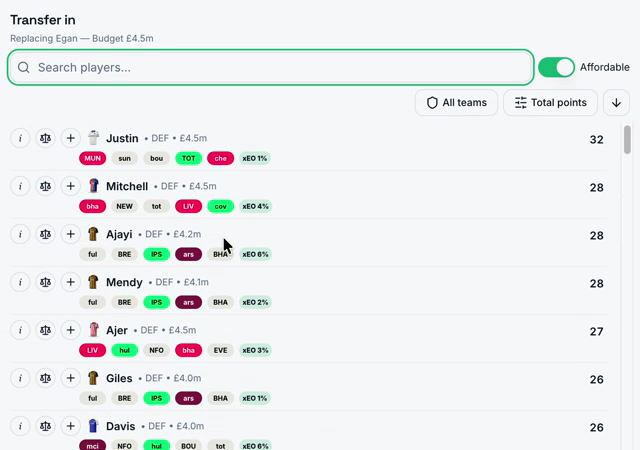
LiveFPL, 11 October 2026: search, affordability, filters and player actions are available in the replacement picker. Detail extracted from our walkthrough recording at 0:24; browser chrome and the team identifier are outside the frame.
nextXI: planning alongside simulations
nextXI is worth exploring if you like to move between a squad plan, fixture probabilities and possible gameweek outcomes. Its free next-gameweek simulation view included player outcome distributions and a range for the team's score, rather than only one predicted total.
The planner supported transfers in future weeks, captaincy, bench changes and chips. Its access rules need a little attention: some later-week predictions appeared on pitch cards while the corresponding player pop-up remained locked. Premium features were identified from pricing pages and lock screens, rather than tested with a subscription.
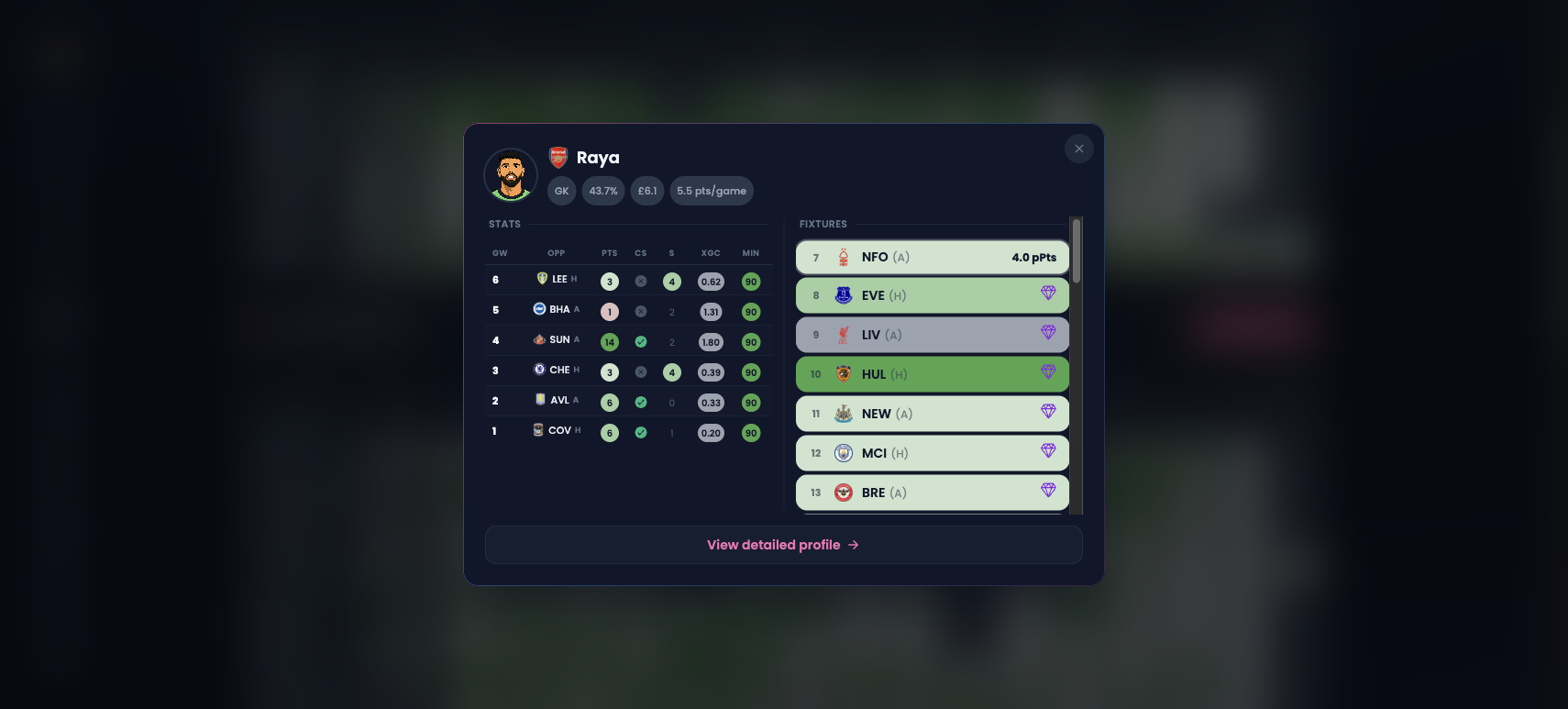
nextXI, 11 October 2026: Raya's next-gameweek prediction is visible in the pop-up, with Premium icons on later fixtures. This capture illustrates the pop-up access rule; later-week pitch cards were checked separately. Original research screenshot.
PlanFPL: ratings and adjustable transfer prices
PlanFPL recalculates predicted points and squad ratings as you change players. It also lets you adjust buying and selling prices for a proposed transfer, which is useful for exploring a move that depends on a price change. Player details include fixtures, set-piece information and rotation partners.
Planning future transfers worked for free. Signing in added account saving, but did not remove later-week prediction locks in our check. The account page described linking Fantasy Football Scout Premium for supported prediction and Opta data. We did not test a linked Premium account, so this is a distinction between the free planning interface and its advertised data access.
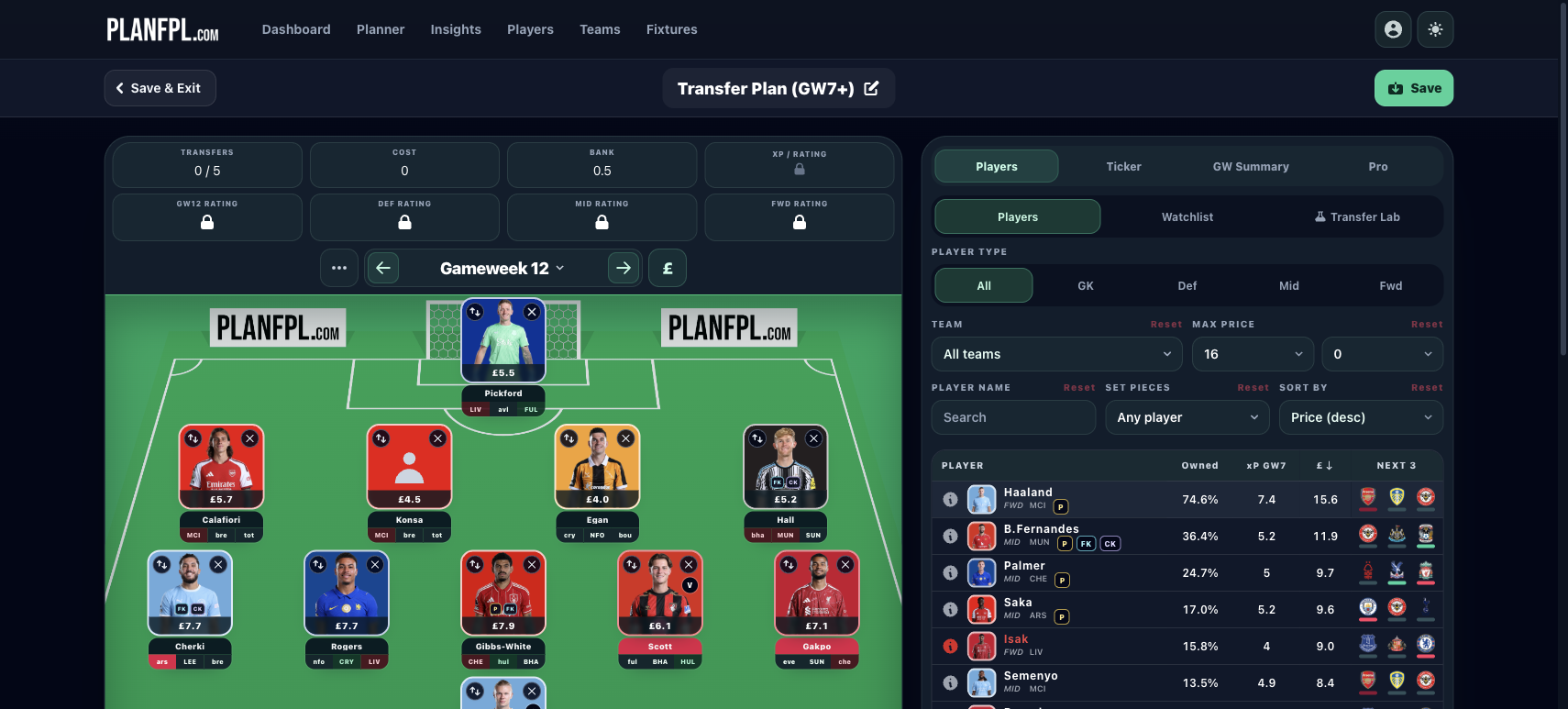
PlanFPL, 11 October 2026: the signed-in GW12 view still shows locks on predicted points and ratings, while the squad and available transfers remain visible. The test account was not linked to Fantasy Football Scout Premium. Original research screenshot.
FPL Cat: a free solver, team rating and a sortable player pool
The FPL Cat planner loads your squad, bank and free transfers from your team ID and plans the next six gameweeks: transfers, rolls, hits, lineup, captain, Bench Boost and Triple Captain, with our model's projected points for every player in every week and a team total after hits. A free plan solver suggests transfers and a lineup for every week of the plan in one tap, explains why each player was picked, and can be undone. The squad is also rated out of 100 against the best squad your budget buys, with the three fixes that would help most.
Beside the pitch is a players list. You can sort it by predicted points for the gameweek you are viewing, by price or by ownership, and also by form, season points, xGI per 90 and DEFCON per 90. Filters cover position, club, an affordable-player toggle and an exclude-injured switch, and each row shows the player's next three fixtures coloured by difficulty.
Tap the star on any row to add a player to your shortlist, a watchlist you can open with one button and which stays with you while you plan. Each row also has a player-information button, a comparison button and a + to bring him into your squad. Predicted points, the shortlist and the sorts above worked for free in our check. Only the six-gameweek player totals, and sorting by them, are Pro.
FPL Cat Pro also adds Wildcards, Free Hits after next gameweek (next gameweek's Free Hit, including a best-squad build, is free), up to 10 saved plans and an AI assistant that discusses your squad. These access details come from our own product documentation.
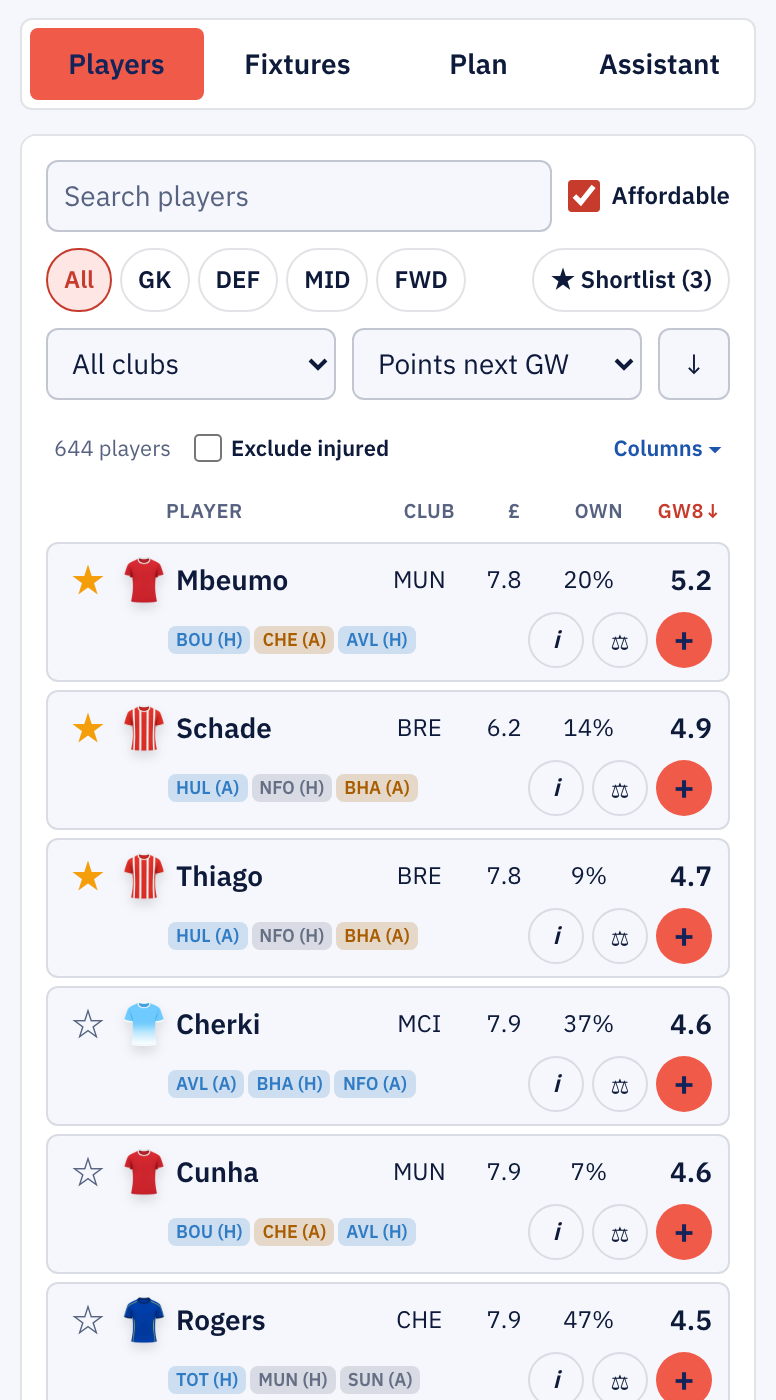
FPL Cat, 18 October 2026: the players list sorted by predicted points for GW8, showing price and ownership, with three players starred in the shortlist. Our own screenshot of a signed-out session, cropped to the players panel.
You can try it with your own team ID on the FPL planner page. We have not run a common forecasting-accuracy or usability benchmark across these services, so including FPL Cat here is not a claim that it performs better.
What the walkthroughs revealed
Three examples show why the detail matters. In PlanFPL, the available free-transfer count rose from two to five as we moved through future weeks without spending them. Next-gameweek squad ratings recalculated after transfers, while later-week ratings stayed locked even after sign-in. In nextXI, later-week predictions appeared on the pitch but were locked in the player pop-up. In LiveFPL, the replacement sheet brought an affordable-player toggle and player comparisons into the transfer-selection step.
These are useful differences to check with your own squad. They do not establish which service predicts points most accurately.
Other FPL tools to consider
These services broaden the shortlist, although the research did not include the same full planner walkthrough for each one.
Fantasy Football Fix and Fantasy Football Hub
Fantasy Football Fix offers a wider collection of tools, including a future planner, team analysis and price-change features. Its FPL Plus browser extension is another option for managers who prefer tools within the official FPL website; it adds a future-gameweek planner with predicted points there. Our research did not complete a signed-in planner test, so we cannot compare its planning experience or paid access in the same detail.
Fantasy Football Hub combines team tools and transfer suggestions with articles and expert content. That combination may suit someone who wants explanations and analysis alongside the numbers. We checked public pages and the entry to its team-rating tool; we did not test the paid planner. Check the particular subscription's tool access and full billing period before purchasing.
FPL Review
FPL Review centres on projections and multi-week transfer optimisation. Its documented offering includes the Massive Data model, a planner, a transfer solver and season-review benchmarking. Its public pages describe projections running 14 gameweeks ahead. It is an option to investigate if you want to examine model-led transfer routes in detail.
Our research covered its public documentation rather than a hands-on paid solver session. Full model and solver access was described through Patreon membership. This comparison does not establish that its forecasts, or anyone else's, are more accurate.
FPL Copilot
FPL Copilot supplies the predictions credited by fpl.team and also offers its own transfer solver and AI chat. Its public planner guide describes suggesting multi-week moves for your existing squad, using selling prices, bank, available transfers and scheduled chips.
That is useful to investigate if you want suggested routes rather than only a place to record your own. Its guide describes free usage allowances and a Pro tier with expanded access. We have not tested its solver or chat here; those are the provider's descriptions, not measured performance findings.
Premier Fantasy Tools
Premier Fantasy Tools brings together a season planner, a free team rating (0–99 with a letter grade, against an optimal squad), player statistics and manager and league tools. Its breadth makes it relevant if you want planning alongside retrospective analysis and tracking.
The research recorded a 38-gameweek planner and a supporter option for fuller access and ad removal. We did not walk through the planner's transfer workflow or test the supporter tier, so check which parts of your intended routine are included before choosing it.
More planners and related apps from the research
Our search research also surfaced the following services. These are discovery notes, not hands-on reviews, and an appearance in search results is not a quality rating.
| Service | What the archived research identified |
|---|---|
| FPL Strat | A transfer planner with a fixture ticker and planning guides |
| FPL Tactics | A team planner alongside player comparisons, fixtures and price-change tools |
| FPL Mania | A planner alongside player comparisons and mini-league tools |
| FPL Planner | A team-planning app with guides on fixtures, chips and blank and double gameweeks |
| FPL Central | Team rating, predictions and a price watchlist; its multi-week planning workflow was not tested |
| FPL DNA | Transfer suggestions and player pages alongside live bonus and DEFCON tools; its multi-week planning workflow was not tested |
| FPL Rotation Planner | A further planning option surfaced by the saved search results; feature and access checks remain outstanding |
How to choose
For a first comparison, try fpl.team, LiveFPL, nextXI, PlanFPL or FPL Cat using your own squad and see what you like. They offer different combinations of predictions, ownership context, simulations and squad ratings, and we were able to explore their planning interfaces for free.
If your priority is a projection-driven solver, investigate FPL Review as well. If you want articles or a broader collection of tools in the same service, include Fantasy Football Hub, Fantasy Football Fix and Premier Fantasy Tools. FPL Cat's planner, described above, is another option if you want a free solver alongside manual planning, or if sorting a player pool by predicted points, price or ownership and keeping a shortlist is how you like to plan.
Choose the one that makes your actual transfer decisions easiest to understand. Check the later-week data you need, how alternatives are saved, and the complete subscription cost. A projected gain is an estimate: minutes, injuries and your own assumptions still matter when deciding whether to make the move.
FPL planner questions
What is the best free FPL planner?
There is no single answer for every workflow. Among the free interfaces we tested, fpl.team showed multi-week player predictions, LiveFPL offered ownership context and comparisons, nextXI combined planning with next-gameweek simulations, PlanFPL showed next-gameweek squad ratings, and FPL Cat combined a free plan solver with a player list you can sort by predicted points, price or ownership. Start with the feature you need, then check the access details in the table above.
What is the difference between an FPL planner and a solver?
A manual planner lets you choose transfers and inspect future squads, budgets and fixtures. A solver searches possible moves and suggests a route using projections and constraints. A planner does not need its own points forecast to be useful, and a solver's suggested gain depends on the assumptions behind its forecasts. Some apps put both in one place: fpl.team's planner lists a limited free solver allowance, and FPL Cat's planner has a free plan solver whose suggestions you can edit or undo.
Do I need to pay to plan future FPL transfers?
All five planners tested here allowed future-week transfer planning for free. Subscriptions can instead unlock later-week prediction details, multi-week totals, additional saved drafts, solver access or ad removal. Free planning and free access to every forecast are different things.
Is this a comparison of iPhone and Android FPL apps?
This article compares web planning tools. Some providers also offer native apps, but we did not comprehensively test their iPhone or Android versions. Do not assume their interfaces, purchases or free access exactly match the web version.
Sources and dates: recorded web-planner walkthroughs on 11 October 2026; public-page and documentation research from 6–11 October; FPL Copilot's linked guide checked on 15 October; FPL Cat checked by us, with its product documentation, on 18 October. Paid access and native apps were not comprehensively tested. Links identify the services discussed; this article contains no affiliate referral codes.
More FPL strategy
- Manchester United: Can You Find FPL Points in the Chaos?
- Bot user agents could be a surprisingly good way to advertise to developers
- The Top 100's GW6 Bets: Newcastle Disappoints, Brighton Pays Off
- I Let My FPL AI Pick a Free Hit. It Dropped Haaland.
- Rate Your FPL Team With AI: Talk FPL With ChatGPT or Claude
- Best FPL DEFCON Defenders 2026/27: Who to Pick and Who Was Best Last Season
- FPL Injuries: International Duty Is No Riskier Than a Gameweek
- Fulham: An FPL Team to Watch Before Their Two Easiest Fixtures of the Season
- FPL DEFCON Midfielders: 16 with Attacking Returns (GW1–5)
- How FPL Bonus Points Work: The BPS Explained (2026/27)
- What the Top 100 FPL Managers Did Differently: The Elite Template After GW5
- Inside the World's #1 FPL Team: Every Chip, Every Transfer, Gameweek by Gameweek
- Should You Buy Pascal Groß in FPL? Not Yet — Here's Why
- Welcome to FPL Cat
- Fantasy Premier League Fixture Difficulty Ratings: What They Do (and Don't) Tell You