
- tools
- 15
- tools
- to use
- Free
- to use
- account needed
- None
- account needed
- never changes your team
- Read-only
- never changes your team
On their own, AI assistants don't know this week's injuries, prices or the current FPL rules, and they can't see your team. FPL Cat is a free connector (an MCP server) that gives them live Fantasy Premier League data and our predictions, on the same engine as this site. You keep asking the way you do now.
What it adds to your assistant
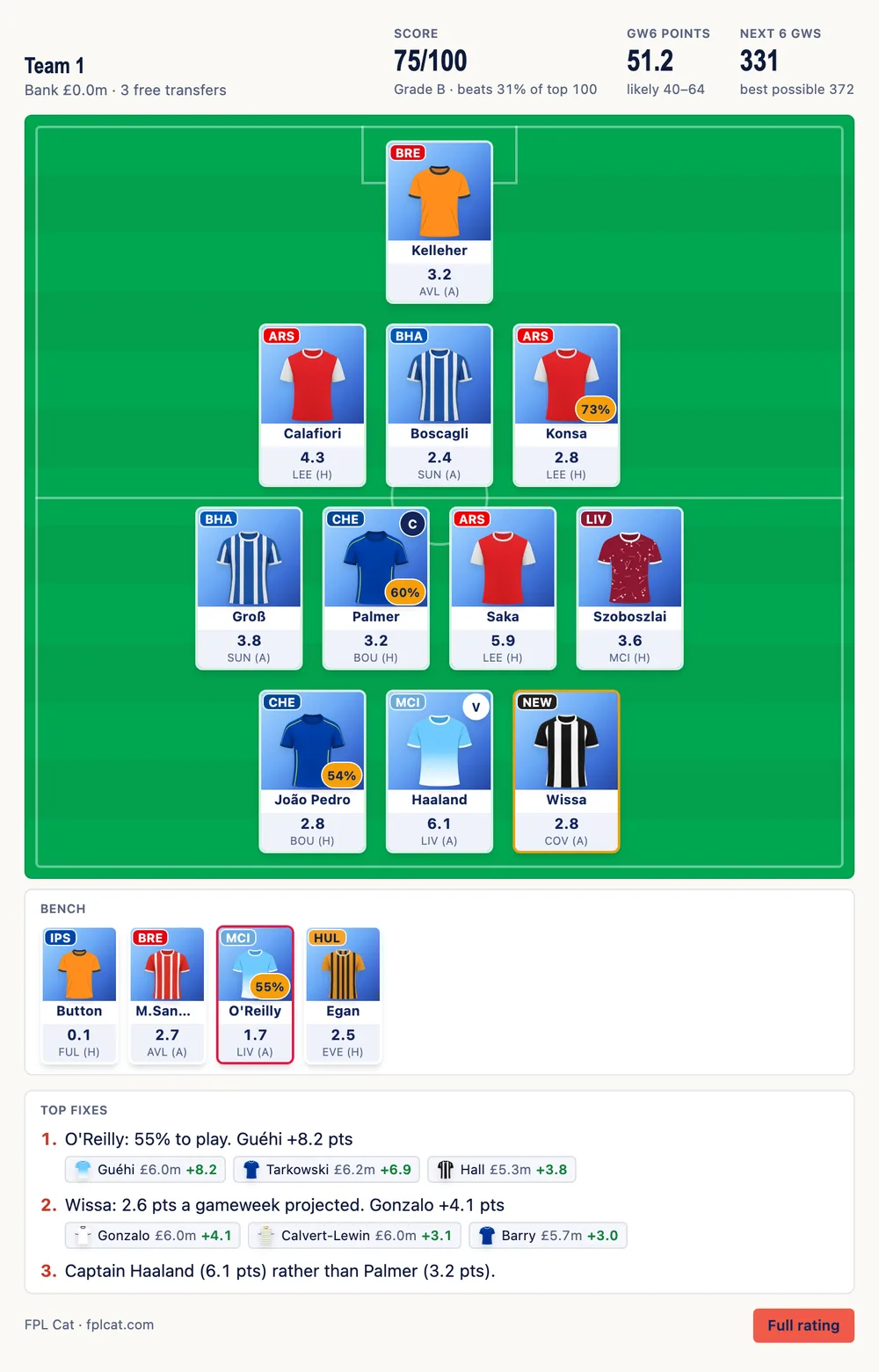
Your team, rated
Give your FPL team ID once and your assistant reads your squad, bank, free transfers and chips: a score out of 100, your lineup and captain, and the changes worth the most.
Try: “Rate my FPL team, ID 1234567”
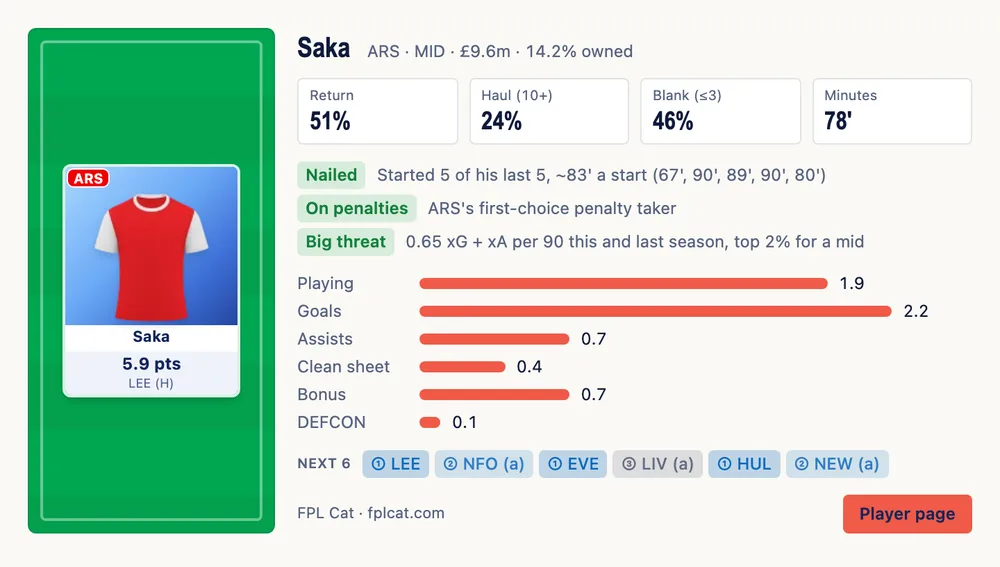
Predicted points for every player
Our model's points for the next gameweek, where they come from (minutes, goals, clean sheets, bonus) and the chances of a return, a haul or a blank.
Try: “Saka or Palmer this week?”
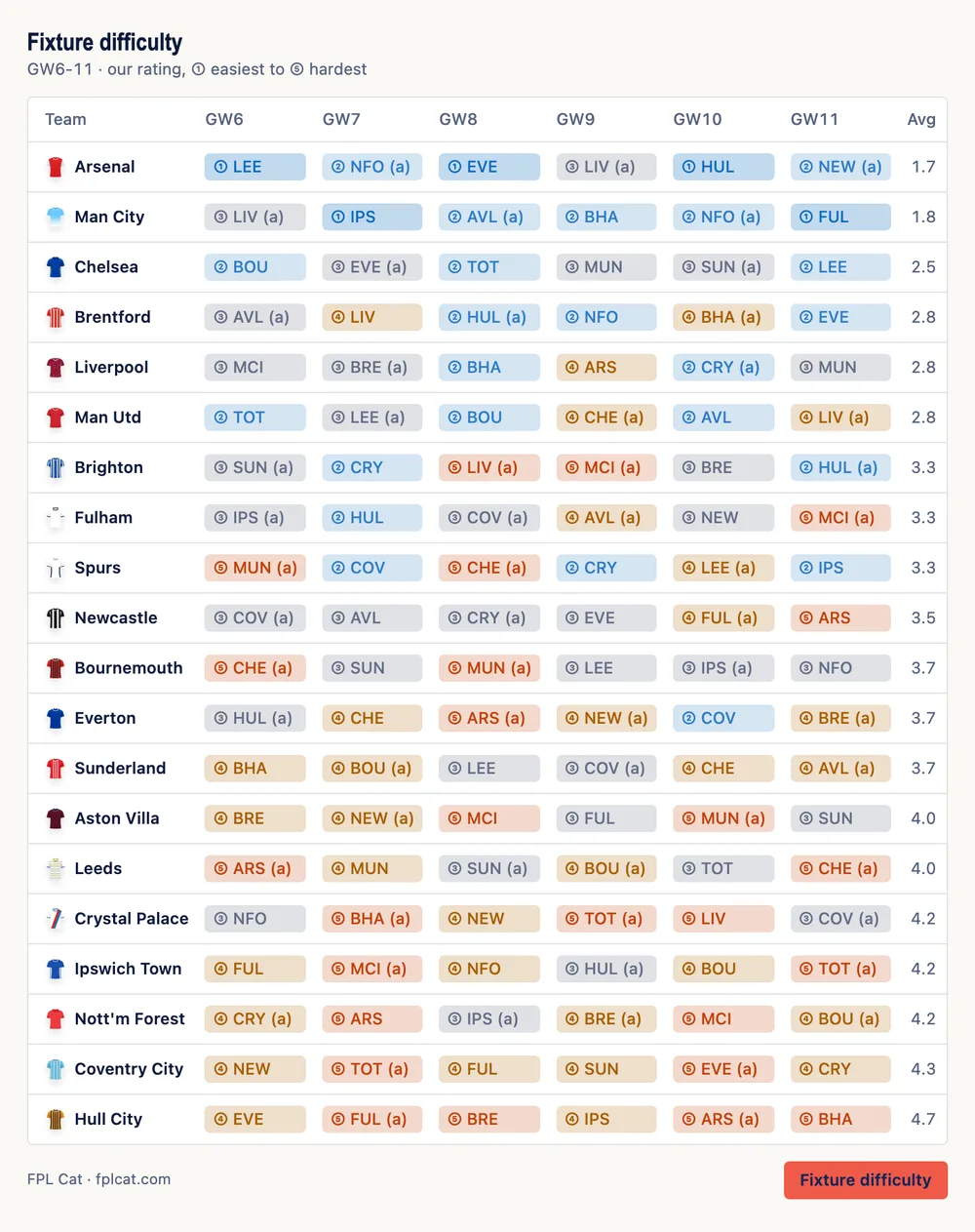
Fixtures, injuries and prices
Fixture difficulty for every club, FPL's injury and doubt flags with the news, price rises and falls, penalty takers and live bonus points during matches.
Try: “Which teams have the easiest fixtures?”
How to add FPL Cat to Claude
On claude.ai and the Claude desktop app, on every plan including Free (Free plans can have one custom connector).
- Open Customize, then Connectors.
- Click + Add, then Add custom connector.
- Name it FPL Cat, paste this address and click Continue:
https://fplcat.com/mcp - For Authentication, choose No sign in, then click Add.
- Start a chat and ask: “Who should I captain this week?” Claude uses FPL Cat by itself when the question needs it.
If Claude answers without it, click + at the bottom left of the message box, open Connectors and switch FPL Cat on. Once added, it's in the Claude mobile app too. On a Team or Enterprise plan, an owner adds it once for everyone under Organization settings, Connectors.
How to add FPL Cat to ChatGPT
FPL Cat isn't in the ChatGPT app directory yet, so for now you add it as a custom MCP server, on the web (chatgpt.com). On a Business or Enterprise workspace, an admin may have to allow custom apps first.
- Open Plugins in the sidebar (or go to chatgpt.com/plugins).
- Click Add, then Create custom MCP server.
- Name it FPL Cat and under Connection paste:
https://fplcat.com/chatgpt - Under Authentication, choose No authentication (not OAuth). Accept the warning ChatGPT shows for every custom server and create it.
- Start a new chat and ask. If ChatGPT answers without FPL Cat, type @, pick FPL Cat and ask again.
Other apps
Anything that supports remote MCP servers can use FPL Cat (Streamable HTTP, no key):
Claude Code
claude mcp add --transport http fpl-cat https://fplcat.com/mcpCursor (mcp.json)
{"mcpServers": {"fpl-cat": {"url": "https://fplcat.com/mcp"}}}VS Code (.vscode/mcp.json)
{"servers": {"fpl-cat": {"type": "http", "url": "https://fplcat.com/mcp"}}}What you can ask
- “Rate my FPL team, ID 1234567”
- Your score out of 100, points for the next gameweek and the next six, and the three changes worth the most, with three replacements each
- “Who should I transfer out?”
- The same fixes, with your bank and free transfers
- “Pick my lineup for this gameweek”
- Our best XI, bench order and captain from your 15
- “Who should I captain?”
- The best captains in the game, or from your squad
- “Is Saka worth buying?”
- Next gameweek's points and where they come from, chance of playing, and his next six fixtures
- “Best midfielders under £7m”
- Players ranked by our model for the next gameweek, with their fixtures
- “Best £100m team”
- Our best Wildcard squad for the next six gameweeks
- “Which teams have the easiest fixtures?”
- Our fixture difficulty for every club
- “Arsenal injuries”
- FPL's injury and doubt flags with the news
- “Who's rising in price tonight?”
- FPL's own progress to the next price change
- “Who's on penalties for Chelsea?”
- Penalty, corner and free kick takers
- “Provisional bonus in the Arsenal game”
- Live BPS and bonus during matches
- “Should I bench boost this week?”
- Which chips you have left and whether to play one now
- “How did my team do?”
- Your gameweek: points against the average, ranks, captain, bench, transfers
- “Remember my team 1234567”
- Saves your team ID to your FPL Cat account, so you don't give it again (asks you to sign in, free)
You can also send a screenshot of your team instead of the ID: the assistant reads the 15 names and passes them on.
What's free
Everything the connector returns is what the site gives for free: next gameweek's points for every player, the free team rating, captain picks, fixtures, injuries and price changes. The six-gameweek detail for every player, more replacement options and the full chip plan are in FPL Cat Pro, as on the site.
Your data
A tool call sends us what the tool needs: your team ID or the player names you asked about, never the rest of your conversation. We look up your public FPL squad the same way the planner does. Our usage stats record which tools are used; a team ID is counted under a scrambled code, never the ID itself. There's no FPL login involved, ever. More in our privacy policy.
Questions
Can ChatGPT help with Fantasy Premier League?
Yes, once FPL Cat is connected. ChatGPT on its own doesn't know this week's injuries, prices or the current rules, and can't see your team. With FPL Cat it looks them up and answers from our model's predicted points, with a card showing the numbers.
How do I add FPL Cat to Claude?
In Claude, open Customize, then Connectors, click Add and choose Add custom connector. Name it FPL Cat, paste https://fplcat.com/mcp, choose No sign in for authentication, then ask an FPL question in a new chat. It works on every plan, Free included.
How do I add FPL Cat to ChatGPT?
On chatgpt.com, open Plugins in the sidebar, click Add, then Create custom MCP server. Name it FPL Cat, paste https://fplcat.com/chatgpt as the connection URL, choose No authentication, then ask your question. FPL Cat isn't in the ChatGPT app directory yet, so it's added this way for now.
Is it free?
Yes. The connector is free and needs no account. It gives the same data the site gives for free.
Do I need my FPL password?
No, never. FPL Cat only needs your team ID, which is public: it's the number after /entry/ in the address of your FPL Points page. You can paste the whole link.
Does FPL Cat see my ChatGPT or Claude conversation?
No. When your assistant uses an FPL Cat tool, we receive only what that tool needs, such as a team ID or player names, never the rest of your chat.
Can it make transfers or set my captain?
No. The tools only read FPL data. You make your moves in the FPL app as usual.
Does it work on my phone?
In Claude, yes: add the connector on the web or desktop and it's in the Claude mobile app too. In ChatGPT, custom MCP servers are added on the web.
My assistant isn't using FPL Cat
Check the connector is switched on for that chat (the + menu in Claude, @ in ChatGPT). If you have other FPL tools connected, say "use FPL Cat" in your question.
Building something? The FPL Cat API has the same projections as JSON, and llms.txt lists every tool. FPL Cat is an independent fan project, not affiliated with or endorsed by the Premier League or Fantasy Premier League.